Showing posts with label secondary science. Show all posts

Monday, May 6, 2019

Science Tools for ESOL / ESL


I began my teaching career in El Paso, Texas. Living on the border to Mexico, teachers have the highest rates of ESOL / ESL students in American schools. What many people do not realize is that these students often come to the U.S. once they enter high school. In Juarez, Mexico families have to pay for high school, so often arrangements are made to send the students across the border where secondary education is free. El Paso high schools are then left with a huge influx of students who have a bare minimum amount of English, or possibly none at all. We also get students who moved back and forth across the border during their schooling and therefore did not master English nor Spanish. Now I teach in California and I have ESOL / ESL students with Asian, Russian, and sometimes Syrian or African backgrounds.  All of these students are teens with knowledge of Science concepts, just not in English.

In order to help these students, excel we first have to overcome the language barrier. Thankfully in some languages, the science vocabulary is filled with cognates, but often common words we use to help explain the concepts are not. I have created Science posters specifically for ESOL / ESL students. These Science posters focus on the English word but have space for the students to write the word in their native language or take notes. Many ESOL / ESL classes focus on English or Math, as a result, there are not as many resources for science. Thankfully there are some publishers who have created Spanish glossaries and Spanish editions, but what about all the other languages our ESOL /ESL students speak? The Science Word Wall ESOL / ESL posters are not focused on any specific foreign language. Any student from any background can use them. The coloring aspect is soothing and gives the students a moment to relax and reflect since the images illustrate the target word. The posters are a similar assignment as the native English speakers and can be displayed together without a difference in content. It is just a nice way to support our ESOL / ESL students.


Monday, October 12, 2015

Dichotomous keys with a touch of the peculiar just right for Halloween in secondary Science

I created two new dichotomous keys in October, one focuses on animals and humanoids with legends, myths, and cryptids. I also threw in some real genetic diseases which are thought to have been the precursor to Halloween ghouls such as vampires and werewolves. The name of this dichotomous key is Cryptozoology Dichotomous Key: Monsters, Spooks, and Ghouls.


The second dichotomous key I created focuses on the odd members of the Plant Kingdom. In this dichotomous key students will classify carnivorous, poisonous or curious plants. The students will use knowledge of planting zones and plant anatomy to complete this dichotomous key. It is called Carnivorous, Poisonous and Curious Botanicals. 


Even if you do not get to use these mind-boggling dichotomous Keys in class for October, there are plenty of other chances you can use these lessons, for your Taxonomy and classification unit, following a state of college board exam? They also make great end of the year activities. Be sure to check out my full collection of dichotomous keys!

*** These dichotomous keys can be printed out on paper, presented to the class as a whole class activity through PowerPoint or uploaded to a password protected classroom website where students can work with a partner, independently or in small groups. 


Cheating in the Age of Technology and Cell Phone Apps...


The fall of 2015 marks the beginning of my fifteenth year of teaching. I have seen all sorts of elaborate schemes that students do in order to “get over” actually doing their work. Now in the age of technology students stop at very little to do the least amount of work possible.

We all know that we have students who have mastered Googling their answers and with the new policy of BYOD (bring your own device), it is hard to always catch the culprits red-handed. Yet most veteran teachers still do, while shaking our heads that we have NEVER seen that one before! J

I learned quite a few years ago that I can no longer go online and download quick worksheets to share with my classes or leave as sub-lessons because my students do the same thing. I can tell because many keys floating on the web have mistakes, and ironically my students copy down the same mistakes.

I am ok with the way things have evolved, it has all worked in my favor though. I have always been a teacher who enjoys creating her own resources, so I get to do more of that.  Although time restraints do make it difficult I am satisfied that my students actually have to work to get the right answer on papers I am planning on grading. I can be neurotic so I may make multiple problem sets and hand different class periods or groups within the class a different set of problems. I let the class know there is no point is asking around, no one will have the same answer.

I recently just finished up a lesson called Dimensional Analysis: Zombie Survival. My students had to work through a series of problems in order to escape the mob of zombies headed their way once the class bell rang. The students had to show me all their work and have the equation in the correct dimensional analysis format. The kids fussed a little or a lot. J Some thought they were smarter than me and ran to google for the answers. These tactics only wasted their time and once the class bell rang, those groups were eaten.

Some of the students' groups were successful. They tackled the math problems head-on. The extra problem, thrown at them as a surprise, did little to hinder their progression. Other groups looked over to see if they could get a glimpse of a corner of the page. However, I warned all the kids that in a true zombie apocalypse it is each group for their own.

The students challenged me on whether such an event could ever truly happen. Well, I asked what do you think life was like after the plague? A hurricane? An earthquake or tsunami? We never know how life may change suddenly and your survival skills need to kick in. Sadly I did have a few kids give up and say they would rather just die. I told them, “Well, thank you for your sacrifice because many of us would like to live.”  

The next day when I met with my classes, I gave them 30 more minutes I told the groups who had been eaten they were actually hiding in a cave and would have 30 minutes to get out. I am aware that by this point lots of photos were taken and passed around. That did not help though since you have to show me all your work and explain your method. Only groups who finished on the first day received 100’s the other students had lower scores depending on how many answers they got right.


Overall it was a successful activity. It was nice to see the kids engaged. I will not let the self-sacrificed spoil the bunch. I know the kids cheat, Google, take pics, snap-chat and it is making me become a more creative teacher. I look forward to designing more activities like this as the school year progresses. 

For teachers who are honestly strapped for time, you can also visit these websites to find great resources and innovative ideas for your classroom: 

Teachers Pay Teachers, TES, or Edmodo 

Let's keep our students guessing! 


Saturday, August 22, 2015

First Give-A-Way for my followers!!

My first give-a-way to my followers is a Lab Safety memory game!

The file is in pdf format and is black and white printer friendly. I suggest printing 9 pages per one sheet of paper. You get the best size and the cards remain easy to read. You can also print them in full size.

Once i printed mine out I glued card stock to the back and am having them laminated for future use. I have seven lab tables so I am making seven sets although I have been contemplating making eight.

I hope you enjoy your first free monthly gift and I look forward to your feedback!

I am leaving the game up for download until Tuesday, August 22, 2015.

Click on the box with the arrow sticking out in the upper right hand corner to open a new window and download the game from there.

Lab Safety Memory Game


Monday, August 3, 2015

Advantages of Electronic Dichotomous Keys

I am ashamed to admit I spent a good portion of my teaching career looking for good dichotomous keys for my students. I asked veteran teachers who would always claim to have an abundance only to disappoint me with bad runoff copies that contained vocabulary neither my native or ELL students could understand. I scoured the internet looking for good dichotomous keys my students could easily understand while exposing them to new organisms. I never found what I wanted.

I finally decided to take matters into my own hands and create my own dichotomous keys. After deciding which organisms I wanted to cover I set off to write the key itself. It took a lot of time, but I was very happy with the results. The first dichotomous key I created covered both bacteria domains, the four kingdoms and had viruses thrown in. It was a great way for me to assess my students understanding of the unique characteristics of those groups and their ability to classify. I thought about how I would present the organisms,

I decided against photocopies due to details often being muddied. I do not work in the richest school district so making class sets of color copies is not feasible either. I decided on presenting the organisms in a power point. The students could log into Schoology and then use their laptops, tablet, or cell phones to access the images. I did print out the dichotomous keys and answer documents.


The power point presentation was a great success! I paired the students up and watched them look at the pictures, read little notes and go through the dichotomous key to identify the organisms and viruses. I could listen to the students debate, about what they thought the answers were and redirect them if they were too far off. I could see what needed to be reviewed and what content my class had mastered.


This led me to creating a second Electronic dichotomous key dedicated to the flora of the Chihuahua desert. I have run across keys with plants that live further north or more humid climates compared to our desert. Although I like to expose my students to environments and creatures outside of our area, it is also important that they learn about their immediate surroundings as well. The next dichotomous key was based on desert plants. I was shocked to see how surprised my students were to see how many flowers our desert has. I had a few students come to class after a weekend to tell me now they noticed that El Paso does have a lot of plants and they remembered the names.


You can purchase these lessons at the following links:

Classifying Organisms Dichotomous Key

Desert Plants Dichotomous Key


Sunday, August 2, 2015

Quest PowerPoints

Last school year during professional developments one of the catchphrases was "academic language."  The administrators were concerned that we were not allowing enough opportunities for students to use their academic language through writing, reading, and speaking. We have all heard about moving towards student facilitated learning and instruction and before that, the buzzword was cooperative learning, essentially in the classroom, these are all similes.

I live in El Paso, Texas where many of my students are bilingual but not mastering either English or Spanish. We often have classes filled with ESOL and LEP students, especially in secondary classrooms. It is imperative that we have our students use the academic language more frequently not only for school but so they can communicate in English effectively.

I thought about the dilemma and came up with a few lessons which proved to be quite successful in my class. After covering major units such as genetics, animals, or plants I want to see where my students' understanding is before testing them. I created a PowerPoint presentation for my students to use. I call it a "Quest PowerPoint" because my students go through the PowerPoint at their own pace preferably with a partner, not a group. The pair of students look at the picture, read the description, and then need to answer a question. The students are given a worksheet for them to record their answers on.

 The students talk to each other while moving from slide to slide, they also have their composition notebooks handy for references. Something beautiful happened when I administered my first Quest PowerPoint over plants. My students talked to each other using academic language. Yes, it was often mixed with Spanish, but they remembered the scientific terms and used them. I make a point to use fascinating scenarios and mind-boggling examples in nature. It keeps the students' interest peaked and discussion flowing. It was nice to walk around the room seeing their faces fixed on the laptop screens and listen to them using the words, and even debating.


I chose to use a PowerPoint demonstration uploaded to the class webpage on Schoology, so the kids could see the colors of photographs and pictures. Photocopies do not offer the emotional impact and grab that a laptop screen can. I had the students write their answers on a worksheet to give their eyes moment pauses from the screen and to keep the kinetic aspect going. Following the first trial, I asked my classroom of ninth-graders how they liked the Quest PowerPoint. They LOVED it! The students were excited about it. I actually got to hear the voices of some of my quiet students who had just joined the American school system.  Since my initial Quest PowerPoint, I created more and the students did not get bored. They were excited. Not only did the Quest reinforce standards taught in class, but the questions were also filled with peculiar and unfamiliar scenarios.


I had students ask me if the events and paradigms were real or made up after discussing it among their peers. I filled the Quests with historical events in which biological systems were affected, little-known facts, and ecosystems far from our Chihuahua desert. The Quest PowerPoints were a great way to encourage academic language while exposing my classes to life outside of the El Paso area and have my students question and ponder the natural world a little more.

I currently have my Plant Quest PowerPointCellular Hierarchy Quest PowerPoint and
  Symbiosis Quest PowerPoint online for purchase.

I also have a Classification of Organisms Dichotomous Key (This dichotomous key spans all the domains, kingdoms, and viruses), and a Desert Plant Dichotomous key online. The dichotomous key work similar to the quests. The students work with a printed dichotomous key and look at the pictures of the organisms in PowerPoint form. I also include a few notes or each organism to help the students. The answer is written on an answer sheet.

Saturday, August 1, 2015

Socrative


I learned about Socrative during the 2014-2015 school year. This was my most overwhelming school year with 176 students. I work in a Health Magnet high school which has 90 minute periods. Due to school districts taking so much of conference periods with meetings and plannings I did not have much time for grading and making copies. Socrative saved my life and sanity in many ways.

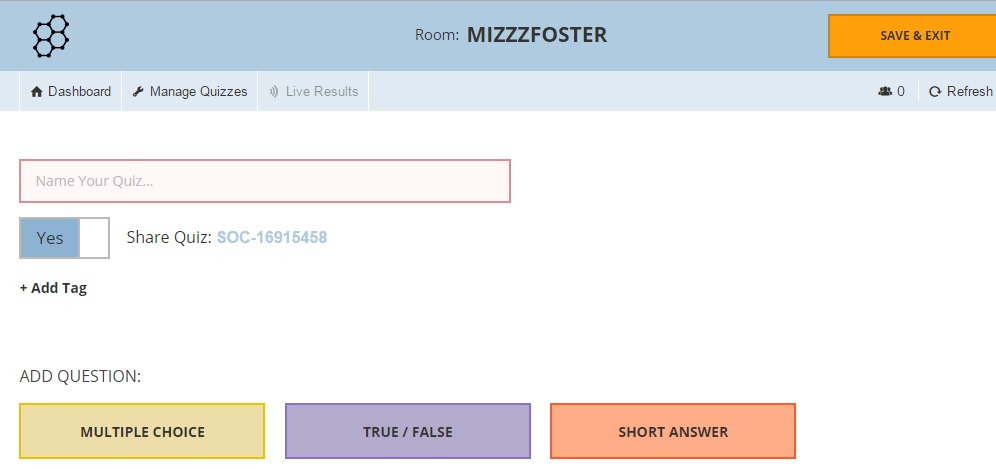
Socrative is a web-based assessment platform. You can also download apps for Android and iPhone. There are both teacher and student apps available for download to both Apple and Android cell phones. You can create short quizzes or full tests. You can also create "Space race" game competitions where students can compete individually or in small groups. I have tried all methods and the students love the variety. I like working from my desktop so that is where I created my assessments. You can add pictures to your questions as well.

Socrative allows you to create multiple choice, True/false and short answer questions. (I learned with the short answer questions that no matter how many different combinations and variations of short answers I made, the students came up with 20,000 more combinations. I ended up having to grade a lot individually so I stopped doing that.)


Socrative is a great way to give assessments. Once you have finished creating your test and saving the answers you can launch the test. Your students can access your account through your classroom code or name. I created a name instead of using the automatically generated code. Students can log on through an app, tablet, laptop or desktop. So for students who do not have a cell phone or tablet they can still access the assessment. Once logged in Socrative asks the students for their name. I had my students type in their last name, then first so that I could see the results in alphabetical order.

When you begin the test you can reduce cheating by the options of mixing up the questions and the answer choices. The computer keeps track so you do not have to worry about grading being a chore. You can also allow the students immediate feedback on whether they got a question right or wrong.


While the students are taking the test you can see the results in real time. There is a screen with the students' names and a grid with the questions. Green squares mean the students got the question correct, while orange screens mean they got the question wrong. You can either view this from a desktop or your own smartphone. It is very helpful because I can see who is staying on task, who is "pretending" to stay on task and monitor results. I will often speak to a student that I see is getting multiple questions wrong. Once everyone has finished you can download different style reports as pdf or excel. You can even create individualized reports to give to each student.

I will continue using Socrative. I thoroughly enjoyed my experience with it this past school year. I have many students use different devices at the same time. Occasionally a student or two got kicked out, but that was due to poor Internet connection and not the actual application. If you have any questions or comments please post below.

Here is the link to Socrative.

***Update 2018 I am still using Socrative. I still love this format. It has kept track of ALL the tests I have ever created and I can share them or make a copy to edit them for my current classes.

Socrative now offers a pro version so you can create specific folders for each class and allow students to take the tests once or twice. One of my fellow colleagues loves this option. He has his students take the tests from home and gives them two trials.